Volvo Cars
Volvo CarsAuto & Vehicles
3.62.01K Reviews
- Version
- 7.2.0
- Installs
- 1.00M
- Age Rating
- Everyone
Screenshots
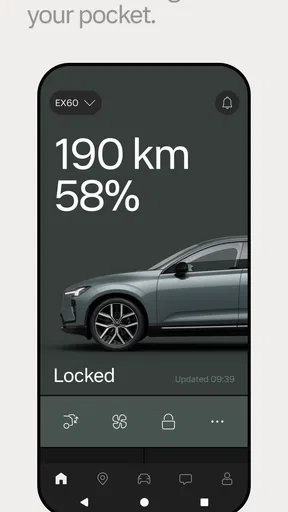
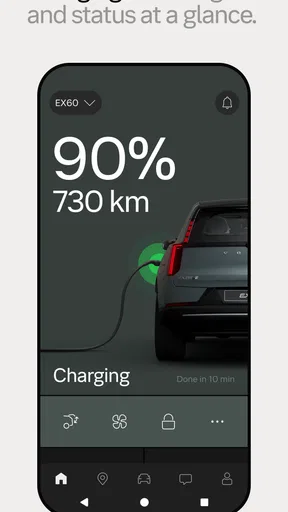
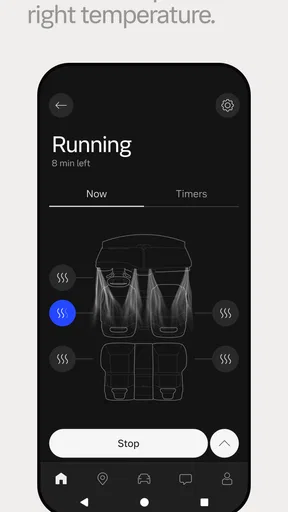
Our Review of Volvo Cars
 Analysis by Appyee
When I look at a car companion app, I am less interested in a long feature list than in one question: does it remove a small piece of daily friction? With Volvo Cars, the most useful idea is having the official Volvo connection in one place rather than jumping between a general navigation app, a browser, and scattered vehicle information. That sounds modest, but it matters when I am preparing for a drive, checking something about my car, or trying to remember where to find help.
This is a free app from Volvo Cars in the Auto & Vehicles category, aimed at people who already drive a compatible Volvo or are considering the ownership experience. It is available to everyone from an age-rating perspective, and the app has been around since June 4, 2014. Its current version is 7.2.0, with support beginning at Android 8.0. On Google Play, it has passed one million installs and holds a 3.6 average from roughly fifty-nine thousand ratings, alongside around two thousand written reviews. Those figures suggest a substantial user base, but also a mixed experience rather than universal satisfaction.
Why the official Volvo connection is the app’s real value
The central capability I kept coming back to is the app’s role as a direct bridge between the owner and the Volvo brand. Instead of treating the car as an isolated machine and searching the wider internet whenever I need information, I can begin with a Volvo-specific place. That distinction is important because generic automotive apps usually focus on reminders, fuel costs, mileage, or broad maintenance tracking. They may be useful, but they do not necessarily understand the relationship between a particular driver and a Volvo vehicle.
The official connection also changes what I expect from the app. I am not opening it simply for entertainment or casual browsing. I want it to be relevant when I am making an ownership decision: before a trip, during a moment of uncertainty, or while trying to understand what should happen next with the car. The best version of this experience is not flashy. It is the confidence that I am looking in the right place.
That makes the app especially interesting for drivers who prefer manufacturer-specific guidance over a collection of unrelated tools. It can sit alongside navigation, maps, insurance, and service apps rather than replacing all of them. In my view, that is the correct way to judge it. It is not a universal driving assistant, and expecting it to behave like one can lead to disappointment. Its strength is the Volvo context.
What this means before and after a drive
Before leaving, I would use a manufacturer app as a preparation point. I can think through the vehicle-related part of the journey without mixing it with the route-planning part. That separation is practical: a navigation app tells me where to go, while the Volvo app is the place I would turn when the question is specifically about the car or the ownership relationship.
After a drive, the same distinction remains useful. A general note-taking app can record anything, but it cannot provide a Volvo-centered path through ownership information. The official app therefore earns its space when I want to keep vehicle matters close to the source rather than relying on memory or random search results.
The important benefit is context, not the number of buttons on screen. If I already know exactly what I need and can find it quickly elsewhere, the app may feel unnecessary. If I regularly have small Volvo-related questions, its official identity becomes much more valuable.
How I would use it in everyday ownership
My practical approach would be to treat Volvo Cars as a starting point, not as the only app on my phone. I would open it when the question begins with “What does this mean for my Volvo?” rather than “What is the fastest route?” or “How much did I spend on fuel?” That simple rule prevents the app from being judged against services designed for completely different jobs.
For a new owner, the first useful session would be about becoming familiar with the app’s layout and deciding whether it reflects the vehicle information I actually care about. I would not wait until a stressful moment to learn where everything is. Spending a few quiet minutes exploring the account and vehicle-related areas is a sensible habit, because official car apps tend to be most valuable when the driver already knows where to look.
For an experienced owner, the workflow is different. The app is less about discovery and more about reducing repeated searching. Instead of typing the same Volvo-related question into a search engine, I would check the official app first. If it does not answer the question, I would then move to the owner’s manual, dealer support, or a general automotive resource. That two-step habit gives me a clear boundary between official guidance and community advice.
A realistic weekday example
Imagine I am leaving work later than planned and have a longer drive home. I do not want to spend several minutes searching for vehicle information while standing in a car park. I would open the Volvo app before getting into the vehicle, look for the relevant ownership or car section, and use that moment to resolve whatever Volvo-specific question prompted me to check it. Then I would switch to my preferred navigation tool for the journey itself.
The value here is not that the app magically handles the entire trip. It is that the preparation is divided sensibly. Volvo Cars handles the manufacturer side; the navigation app handles the road. That is a better workflow than forcing one app to do everything, and it also reduces the chance of confusing general driving advice with information intended for a Volvo.
A second useful situation is when another person drives the car. If a partner or family member asks a question about the vehicle, I would rather point them toward the official Volvo channel than send them through a series of unrelated web pages. This is particularly helpful for occasional drivers who do not remember every detail of the car and need a clear place to begin.
How I would decide whether information is enough
One of the less obvious skills with a manufacturer app is knowing when to stop using it. I would use it for orientation and routine ownership questions, but I would not treat an app screen as a substitute for professional diagnosis when the car shows a warning, behaves unusually, or may be unsafe to drive. In those situations, the correct next step is appropriate support, not prolonged tapping through an app.
I would also keep the owner’s manual available. An official app can be more convenient on a phone, but the manual remains a useful reference when I need detailed vehicle-specific instructions. The app and manual work best together: the app helps me reach the right information quickly, while the manual is better suited to careful reading and deeper reference.
The strongest scenario: making ownership less fragmented
The people most likely to appreciate this app are not necessarily technology enthusiasts. They are drivers who dislike fragmented ownership. If I have one place for Volvo-related information, I spend less time wondering whether a result applies to my exact brand and less time sorting through generic advice written for completely different vehicles.
This is particularly helpful during the first weeks with a Volvo. New owners often have several small questions rather than one dramatic problem. They may want to understand the vehicle’s information, locate the right support path, or become comfortable with the manufacturer’s way of presenting ownership details. An official app can make that learning curve feel more organized.
It can also help a careful buyer understand the kind of digital relationship Volvo offers around its vehicles. I would not choose a car solely because of a companion app, but I would consider whether the app feels like a useful extension of ownership. For someone who values having manufacturer material close at hand, that may influence the overall impression of the brand.
There is a practical advantage for households with more than one driver as well. Rather than explaining every detail verbally, I can direct another driver to the same official source. That does not remove the need to communicate about the car, but it gives everyone a common reference point and reduces reliance on one person’s memory.
Why this is different from general automotive alternatives
General automotive apps often win when the task is broad and data-driven. They may be better for comparing fuel expenses, keeping a maintenance diary across several brands, organizing reminders, or managing a mixed household fleet. If I owned cars from different manufacturers, I might prefer one neutral tool for everything.
Volvo Cars has a different advantage: specificity. A neutral service must cover many brands and therefore cannot make Volvo the center of every screen. The official app can be more relevant when my question is tied directly to Volvo ownership. That trade-off is clear. I would choose the Volvo app for brand-specific context and a general automotive tool for cross-brand organization.
It also differs from a browser search. Search engines are excellent when I know the exact phrase to type, but they can return outdated, unofficial, or vehicle-mismatched material. Starting with the manufacturer’s app gives me a more focused first stop. I still retain the flexibility of the wider web, but I do not have to begin there every time.
For navigation, traffic, and live route decisions, I would still use the service I trust for those tasks. The official Volvo app should complement that choice, not compete with it. This is one of the clearest ways to avoid overestimating what a car companion app should do.
The friction I noticed and the trade-offs to accept
The 3.6 average rating tells me that the experience is not consistently smooth for everyone. I would take that seriously without assuming every criticism applies to every phone or Volvo. Official vehicle apps depend on a relationship between the app, the user account, the vehicle, and the manufacturer’s connected systems. When any link in that chain feels slow, confusing, or unreliable, the whole app can seem disappointing even if its basic idea is sound.
That dependence is the main trade-off. A standalone notes app opens and works without knowing anything about my car. A Volvo-focused app has more relevant context, but it also asks me to accept a more structured ownership experience. I may need to sign in, identify the correct vehicle, or follow the app’s preferred route before reaching what I want. That can feel like extra effort for a question I expected to answer immediately.
I would also avoid installing it with the expectation that it will replace every other driving tool. The app’s official position is its reason to exist, but that does not automatically make it the best option for navigation, trip planning, expense tracking, or broad maintenance management. People who want one neutral dashboard for several vehicles may find the manufacturer-specific approach restrictive.
Another limitation is psychological rather than technical: an app can make ownership feel more organized, but it cannot remove the need to understand the vehicle. I would still read important instructions, pay attention to dashboard warnings, and contact qualified support when something seems wrong. The app is a convenience layer, not a guarantee that every situation can be solved from a phone.
Who should skip it
I would skip Volvo Cars if I did not own or seriously interact with a Volvo. Its value comes from the brand relationship, so a driver of another make is unlikely to gain much from keeping it installed. I would also hesitate if I wanted a single app to manage several vehicle brands in exactly the same way.
It may also be the wrong choice for someone who prefers a paper manual, a dealer relationship, or a general automotive organizer and rarely checks manufacturer apps. Installing an app simply because it is official does not make sense if I will never open it. The best reason to use it is a recurring Volvo-specific need.
On the other hand, I would recommend trying it to a Volvo owner who often searches the web for basic vehicle information or who wants a more direct connection to the manufacturer. The price is free, so the decision is mainly about usefulness, setup effort, and whether the app fits the way that person already manages the car.
Small habits that make the app more useful
My first tip is to explore it when I am not in a hurry. I would identify the main vehicle and ownership areas during a calm moment, then remember the path to the information I am most likely to need. This turns a future roadside or car-park check into a short routine rather than an experiment.
My second tip is to use it as the first source, not the final authority in every situation. If I need brand-specific orientation, I would begin in Volvo Cars. If I need detailed technical instructions, I would compare the result with the vehicle manual. If the issue involves safety or a mechanical fault, I would move promptly to professional assistance.
My third tip is to keep the app’s job separate from the jobs of other apps. I would not judge it because it lacks the workflow of a fuel tracker, nor would I blame a navigation app for not providing Volvo ownership context. Assigning each app a clear role makes the entire phone setup easier to use.
Finally, I would check that I am looking at the correct vehicle and account context before relying on any displayed information. This is an easy detail to overlook when several people share a car or when a phone has been set up again. A few seconds of checking can prevent the most frustrating kind of mistake: acting on information that belongs to a different vehicle or user profile.
My recommendation for Volvo drivers
After weighing the convenience against the friction, I see Volvo Cars as a focused companion rather than an all-purpose driving app. Its best contribution is the official Volvo context: a more direct place to begin when the question concerns the vehicle, the brand, or the ownership experience. That is a meaningful benefit for the right driver, even though it will not replace navigation, a manual, or professional service.
The app’s long availability, broad install base, free price, and current Android support make it easy for eligible users to try. The mixed average rating is a useful reminder to keep expectations realistic. I would install it because I own a Volvo and want manufacturer-specific information close at hand, not because I expect a perfect digital command center.
For me, the deciding question is simple: do I want a neutral automotive organizer, or do I want a Volvo-centered starting point? If the answer is the second, this app makes sense. Its real strength is reducing the distance between a Volvo owner and the official source of vehicle information. If that connection is not something I would use, a general automotive app or the traditional manual may be a better fit.
Verdict
Strengths of Volvo Cars
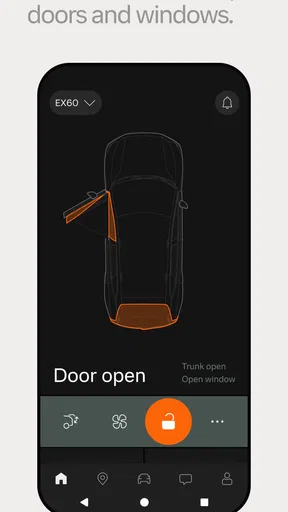
- Remote locking, climate control, and charging features are convenient.
- Service reminders help owners keep track of scheduled maintenance.
- Vehicle details and manuals are easy to find in one place.
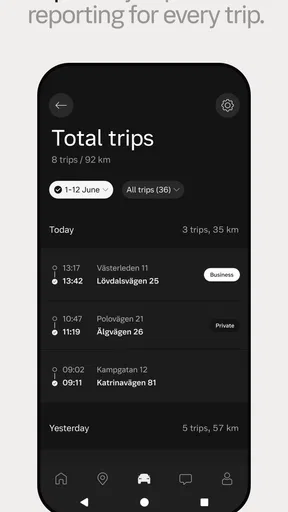
- Trip information can help monitor driving habits and vehicle usage.
- Clean interface makes the main vehicle controls simple to access.
Limitations of Volvo Cars
- Many features require a compatible Volvo and connected services plan.
- Remote commands may respond slowly when the car has a weak signal.
- Some functions vary significantly by vehicle model and market.
- The app can use noticeable battery power with frequent notifications.
- Occasional sign-in or connection issues may interrupt access to car features.
Similar Picks in This Category
View All
Android Auto
Google LLC4.1

maxim — order a taxi & food
PT. SITO4.7

Штрафы ГИБДД: проверка с фото
Pays LLC – Штрафы ГИБДД4.7

Номерограм – проверка авто
Авто Ассист4.8

Дром Авто
Дром4.9

Frequently Asked Questions
What is the Volvo Cars app used for?
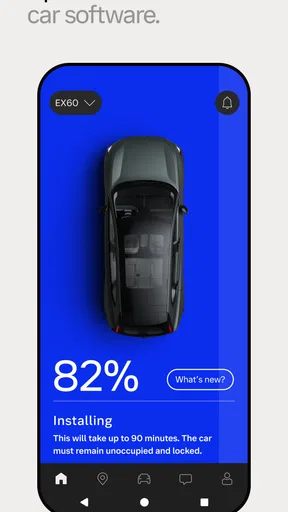
The Volvo Cars app is the official companion for compatible Volvo vehicles. After pairing your car, you can view important vehicle information, check the battery or fuel status, schedule charging, locate the vehicle, and manage selected remote functions. Depending on the model, market, subscription, and connectivity package, the app may also support remote locking, climate control, trip information, and service reminders.
Which Volvo vehicles are compatible with the Volvo Cars app?
Compatibility depends on the Volvo model, model year, country, software version, and connected-services subscription. Newer electric and connected vehicles generally offer the broadest range of features, while older models may provide fewer remote controls or require a specific data plan. Before downloading, check Volvo’s official compatibility information and confirm that your vehicle supports the services available in your region.
Can I remotely lock, unlock, or start climate control with the app?
On supported vehicles, the Volvo Cars app can let you lock or unlock the doors and start or schedule the cabin climate system remotely. Electric models may also allow battery charging controls and departure-time planning. These functions are not available on every Volvo, and remote engine starting is not universally supported. Safety rules, vehicle status, connectivity, and subscription requirements can also limit operation.
Does the Volvo Cars app require a subscription or an internet connection?
The app requires an internet connection on your phone and communication between the vehicle and Volvo’s connected services. Some basic information may be available without an active paid plan, but remote functions and advanced services can depend on a subscription, trial period, mobile network coverage, or a compatible connectivity package. Availability and pricing vary by vehicle, country, and Volvo service agreement.
Is the Volvo Cars app safe and easy to use?
The Volvo Cars app uses account authentication and vehicle pairing to help protect access to connected-car features. In my experience, the main dashboard is straightforward, although initial setup may require the Volvo ID, verification, permissions, and time for the vehicle to synchronize. Users should keep the app updated, protect their login details, and avoid sharing account access casually because remote functions can affect vehicle security and comfort.
